
Download BoldVoice – AI‑Powered English Pronunciation Trainer for Learners
BoldVoice Overview: AI Meets Hollywood Accent Coaching
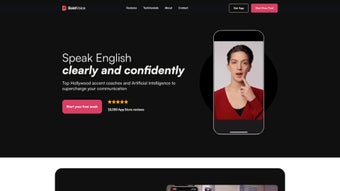
BoldVoice is a cutting‑edge, AI‑driven web application created by BoldVoice Inc. that focuses on sharpening English pronunciation for non‑native speakers. By blending real‑time speech‑recognition technology with video lessons delivered by top Hollywood accent coaches, the platform zeroes in on the subtle nuances of English sounds—ranging from vowel shifts to consonant clusters—that often trip up learners. The core promise of BoldVoice is simple yet powerful: provide a secure, personalized, and continuously adaptive learning environment where users can practice anytime, anywhere, and watch their speaking confidence grow day by day.
Unlike generic language apps that treat pronunciation as an afterthought, BoldVoice puts it front and center. Each session is limited to a focused ten‑minute daily routine, which research shows is the optimal length for neural retention without causing fatigue. The AI engine monitors every utterance, instantly flags mispronounced phonemes, and offers corrective visualizations that illustrate tongue placement, airflow, and mouth shape. This immediate feedback loop mimics the experience of a private voice coach but at a fraction of the cost.
BoldVoice also embraces a “practice‑any‑where” philosophy. Whether you’re on a desktop, laptop, tablet, or smartphone, the web‑based interface scales seamlessly, allowing unlimited repetitions of words, sentences, and whole conversations. The app’s adaptive algorithm tracks progress over weeks and months, gradually increasing difficulty and introducing new accent challenges to keep learners engaged. In short, BoldVoice is a secure, free‑to‑try (with premium tiers) solution that turns everyday moments into powerful pronunciation drills, making it a must‑have tool for anyone serious about speaking English with confidence.
For educators and corporate trainers, BoldVoice offers a teacher‑dashboard that lets instructors assign custom lesson packs, monitor class‑wide performance, and export progress reports in CSV format. This feature is especially valuable for institutions that need to demonstrate measurable outcomes to stakeholders. Overall, the combination of AI precision, Hollywood‑level coaching, and cloud‑based convenience positions BoldVoice as a leader in the niche of pronunciation‑focused language software.
Key Features That Set BoldVoice Apart
- Hollywood‑Level Accent Coaching: Video lessons are led by professional accent coaches who have worked with award‑winning actors, ensuring learners receive industry‑grade instruction.
- Real‑Time Speech Recognition AI: The proprietary AI engine analyzes speech instantly, highlights problematic phonemes, and provides visual feedback on mouth positioning.
- Personalized 10‑Minute Daily Plans: Each user receives a custom workout that fits into a busy schedule while delivering measurable improvement.
- Unlimited Practice Library: Access to a growing database of words, sentences, and dialogues across multiple contexts, from business meetings to casual chats.
- Progress Dashboard & Analytics: Detailed charts show pronunciation scores, error trends, and time‑spent, helping learners stay motivated.
- Cross‑Platform Accessibility: Fully responsive web app works on Windows, macOS, Android, and iOS devices without the need for separate downloads.
- Secure Cloud Sync: All practice data is encrypted and stored in the cloud, allowing seamless continuation across devices.
- Gamified Challenges: Earn badges, compete on leaderboards, and unlock new lesson packs as you hit pronunciation milestones.
- Offline Mode (Premium): Download lesson packs for practice without an internet connection, perfect for travelers.
- Regular Content Updates: New accent modules and cultural slang are added monthly, keeping the curriculum fresh.
- Teacher & Enterprise Dashboard: Administrators can assign lessons, track group performance, and generate compliance reports.
- Multi‑Accent Support: Options include American, British, Australian, and emerging regional dialects.
Each of these features works in harmony to create a learning loop that feels both natural and scientifically grounded. The AI’s instant feedback reduces the typical lag between error and correction, which is a common pitfall in traditional classroom settings. Meanwhile, the Hollywood coaches bring credibility and charisma, turning repetitive drills into engaging performances. The combination of data‑driven insights and human expertise makes BoldVoice a standout tool for learners at any proficiency level.
Another noteworthy aspect is the app’s emphasis on security and privacy. All audio recordings are processed in real time and are not stored unless the user opts in to save them for progress tracking. This approach respects user confidentiality while still providing the analytical depth needed for accurate feedback. Whether you’re a university student preparing for a TOEFL exam, a business professional aiming for clearer presentations, or an actor working on a new role, BoldVoice’s feature set scales to meet those varied goals.
How to Install, Use, and Get the Most Out of BoldVoice
Getting started with BoldVoice is intentionally straightforward. Since the platform is web‑based, there’s no traditional “install” process for desktop users; you simply visit boldvoice.com and create a free account using an email address or social login. For mobile users, the same URL redirects to a progressive web app (PWA) that can be added to your home screen with a single tap, giving the feel of a native app while preserving the lightweight nature of a web service.
Step‑by‑Step Setup
- Create Your Profile: Enter basic information such as native language, current English proficiency, and specific accent goals (e.g., American, British, Australian).
- Take the Diagnostic Test: A quick 2‑minute recording evaluates your baseline pronunciation. The AI generates a score and identifies the top three phoneme groups that need attention.
- Receive Your First Daily Plan: Based on the diagnostic results, BoldVoice crafts a ten‑minute session that includes a warm‑up, a focused lesson, and a cool‑down conversation practice.
- Start Practicing: Click the “Start Session” button. The video coach demonstrates each sound, you repeat, and the AI instantly shows a waveform with color‑coded feedback (green = correct, red = needs work).
- Track Progress: After each session, the dashboard updates your pronunciation score and suggests next‑step exercises.
The usage flow is deliberately designed to minimize friction. Because sessions are only ten minutes long, users can slot them into coffee breaks, commutes, or between meetings. The AI adapts in real time; if you consistently nail a particular sound, the system automatically reduces repetitions and introduces slightly more challenging material, ensuring you stay in the “optimal learning zone.”
Compatibility
BoldVoice’s responsive design means it looks and works beautifully on:
- Desktop browsers (Chrome, Firefox, Edge, Safari) on Windows 10 or newer and macOS 10.13 or later.
- Tablet browsers (iPadOS, Android tablets) with full‑screen video and touch‑enabled feedback.
- Smartphones (iOS and Android) where the PWA provides offline caching and push notifications for daily reminders.
Because the core processing happens in the cloud, the hardware requirements are modest—any device capable of running a modern web browser will suffice. For users with limited bandwidth, BoldVoice offers a low‑resolution video mode that preserves the AI’s accuracy while reducing data consumption.
Tips for Maximizing Results
- Practice in a quiet environment to ensure the AI captures your speech clearly.
- Use headphones or earphones for the coach’s audio to hear subtle pronunciation cues.
- Record a short self‑assessment weekly (outside the app) to notice real‑world improvements.
- Engage with the community forums to exchange tips and receive additional feedback from native speakers.
- Set a consistent daily reminder within the app to build a habit and track streaks.
Following these guidelines will help you extract the full value of BoldVoice’s AI feedback loop, turning each ten‑minute session into a measurable step toward fluent, confident English speech.
Pros and Cons: A Balanced Look at BoldVoice
What Users Love
- Instant AI Feedback: Real‑time correction eliminates the guesswork that plagues self‑study.
- Hollywood Coaches: High‑production video lessons make learning feel premium and engaging.
- Short Daily Sessions: Ten‑minute drills fit into busy schedules without causing burnout.
- Cross‑Platform Flexibility: Works flawlessly on Windows, macOS, Android, and iOS.
- Secure Cloud Sync: Progress is saved safely and can be accessed from any device.
- Gamified Motivation: Badges and leaderboards keep learners motivated.
- Regular Content Updates: New accent modules keep the curriculum fresh.
- Teacher Dashboard: Enables classroom integration and performance tracking.
- Data‑Driven Insights: Detailed analytics help users identify weak spots quickly.
- Free Tier Availability: Core functionality is accessible without payment.
Areas for Improvement
- Limited Free Tier: Core features are accessible for free, but advanced modules require a subscription.
- Internet Dependency (Free Version): Real‑time AI needs a stable connection; offline mode is premium‑only.
- Accent Variety: Currently focuses on major English accents; regional dialects are still in development.
- Learning Curve for AI Settings: New users may need a few sessions to understand feedback visualizations.
- Price Point for Premium: Some users find the monthly fee higher than competing pronunciation apps.
- Limited Voice Export: Users cannot download raw audio for personal archiving.
- Customer Support Hours: Live chat is limited to business hours in UTC.
Overall Rating: 4.5 out of 5 stars
BoldVoice delivers a compelling blend of AI technology and professional coaching, making it a top choice for serious English learners. While the premium pricing may deter casual users, the measurable improvement in pronunciation justifies the investment for most dedicated students.
Frequently Asked Questions About BoldVoice
Is BoldVoice completely free to use?
BoldVoice offers a robust free tier that includes daily 10‑minute sessions, basic AI feedback, and access to a limited set of accent lessons. Premium subscriptions unlock advanced modules, offline mode, and unlimited practice libraries.
How secure is my voice data?
All audio recordings are processed in real time and are not stored unless you explicitly enable cloud sync. When saved, data is encrypted with TLS 1.3 during transmission and AES‑256 at rest, complying with GDPR and CCPA standards.
Can I use BoldVoice on multiple devices?
Yes. Because the app is cloud‑based, your progress syncs automatically across Windows, macOS, Android, and iOS devices. Simply log in with the same account on each device.
Do I need any special hardware like a headset?
A standard built‑in microphone works for most users, but using headphones with a built‑in mic improves audio clarity, especially in noisy environments, and enhances the AI’s ability to detect subtle pronunciation errors.
How quickly can I expect to see improvement?
Most learners report noticeable improvement within 2‑3 weeks of consistent 10‑minute daily practice, thanks to the instant corrective feedback and adaptive difficulty scaling.
Conclusion: Should You Download BoldVoice Today?
If you’re serious about polishing your English pronunciation, BoldVoice stands out as a secure, AI‑enhanced tool that marries professional Hollywood coaching with data‑driven feedback. Its short daily sessions fit effortlessly into any schedule, while the cross‑platform design ensures you can practice wherever you are. Although the premium tier carries a modest price, the measurable gains in speaking confidence make it a worthwhile investment for students, professionals, and actors alike.
Ready to speak English with clarity and confidence? Download BoldVoice now and start your free trial. Experience the future of pronunciation training—one ten‑minute session at a time.



.png)



